Build and Deployment of Java EE Web Application (Airline Ticket Reservation)

Background: 
To develop Java EE web application using standard Eclipse Java IDE has many limitations, to overcome those limitations the Eclipse project has already created "Java EE Developers". Below are the steps to demonstrate, Building and Deployment of Web Application on JBoss Application server using "Java EE Developer".

Steps:
1) Download and Install "Eclipse IDE for Java EE Developers"
http://www.eclipse.org/downloads/?osType=win32

2) Create new project by selecting "Dynamic Web Project"
    [File][New][Project...][Web]

3) Set Project name : AirlineTicketReservation
   (Keep other values to default)

4) Add reference to the external Servlet library so that we can use Servlet API in our application
[jboss-5.0.1.GA/common/lib/servlet-api.jar]
/AirlineTicketReservation/WebContent/WEB-INF/web.xml
/AirlineTicketReservation/WebContent/searchView.html
/AirlineTicketReservation/src/controller/SearchController.java
/AirlineTicketReservation/WebContent/image/airline.png

6) Build the project
7) Export as a WAR (Web Archive) file :  AirlineTicketReservation.war
8) Deploy the WAR file to application server (Such as JBoss)
9) Access web application using URL with the web application context AirlineTicketReservation
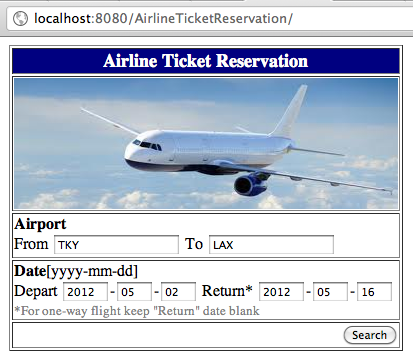
10) Confirm log information
11) Source reference:
i) /AirlineTicketReservation/WebContent/WEB-INF/web.xml
<?xml version="1.0" encoding="ISO-8859-1"?>

<web-app xmlns="http://java.sun.com/xml/ns/j2ee"
  xmlns:xsi="http://www.w3.org/2001/XMLSchema-instance"
  xsi:schemaLocation="http://java.sun.com/xml/ns/j2ee
   http://java.sun.com/xml/ns/j2ee/web-app_2_4.xsd"
  version="2.4">

  <welcome-file-list>
     <welcome-file>searchView.html</welcome-file>
  </welcome-file-list>
  
  <servlet>
    <servlet-name>searchController</servlet-name>
    <servlet-class>controller.SearchController</servlet-class>
  </servlet>

  <servlet-mapping>
    <servlet-name>searchController</servlet-name>
    <url-pattern>/searchController.do</url-pattern>
  </servlet-mapping>
    
</web-app>


ii) /AirlineTicketReservation/WebContent/searchView.html
<html>

<head>
<meta http-equiv="Content-Type" content="text/html; charset=ISO-8859-1">
<title>Search Flight</title>
</head>
<body>

<form action="searchController.do" method="post">
<table border = "1" align="center">
  <tr>
<td align ="center" valign="bottom" bgcolor="#000080">
<font size="4" color="#FFFFFF"><b>Airline Ticket Reservation</b></font>
</td>
</tr>
<tr>
<td>
          <img src="image/airline.png" alt="Airline" width=100% height=100%>
</td>
</tr>
<tr>
<td>
<b>Airport</b> <br/>
From <input type="text" name="fromAirport" value="NRT">
To <input type="text" name="toAirport" value="LAX">
</td>
</tr>
<tr>
<td align="left">
<b>Date</b>[yyyy-mm-dd]<br/>
Depart <input type="text" name="fromYear" size="4">-<input type="text" name="fromMonth" size="2">-<input type="text" name="fromDay" size="2">
Return*   <input type="text" name="toYear" size="4"  >-<input type="text" name="toMonth"  size="2" >-<input type="text" name="toDay" size="2">
<br/>
<font size="2" color="#808080">*For one-way flight keep "Return" date blank</font>
</td>
</tr>
<tr>
<td align="right">
<input type="submit" value="Search">
</td>
</tr>
</table>
</form>

</body>
</html>

iii) /AirlineTicketReservation/src/controller/SearchController.java
package controller;
import java.io.IOException;
import java.io.PrintWriter;

import javax.servlet.ServletException;
import javax.servlet.http.HttpServlet;
import javax.servlet.http.HttpServletRequest;
import javax.servlet.http.HttpServletResponse;


public class SearchController extends HttpServlet {

@Override
        protected void doPost(HttpServletRequest req, HttpServletResponse resp)throws ServletException, IOException {
System.out.println("Calling doPost...");
String fromAirport = req.getParameter("fromAirport");
String toAirport = req.getParameter("toAirport");
System.out.println("From airport =" + fromAirport);
System.out.println("To   airport =" + toAirport);
}
}

iv) /AirlineTicketReservation/WebContent/image/airline.png

How to configure Eclipse IDE Code Completion key binding on Mac OSX

Follow below steps to assign [Ctrl + Space] combination for code completion in Eclipse for Java IDE.

Steps:
i) Open Eclipse Preferences
ii) Under [General][Keys] check for [Command] column
iii) Change [Content Assist] Binding to [^Space]
(Make sure the Binding is not already in use by any other Software including another Eclipse IDE)
iv) Apply changes

JavaEE Pragmatic Introduction

1) Background:
Below steps demonstrate about creation of workable web application based on Java EE architecture. This application will be deployed on "Application Server" [JBoss].


2) Application Server: JBoss 
http://sourceforge.net/projects/jboss/files/JBoss/JBoss-5.0.1.GA/jboss-5.0.1.GA-jdk6.zip/download

- Getting Started:
i) Unzip jboss-5.0.1.GA-jdk6.zip to appropriate location (/user/local/ or c:/)
ii) check for run.bat (windows) or run.sh (unix/linux like systems) and execute it
[use -b option to run it with IP address or hostname, so that it can be accessed using IP or Hostname instead of localhost always]
./run.sh -b 0.0.0.0
iii) check for the runtime logs to see if the server started without any errors


3) UML Tools:
http://astah.net/download
http://argouml.tigris.org/


4) Basic Application Structure:
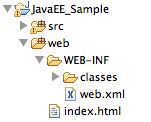
i) Create new Java project in eclipse [JavaEE_Sample]
        
ii) Add new [Source Folder] named : web
                 

iii) Add new [Folder] named : WEB-INF under web source folder [web/WEB-INF]
iv) Add new file web.xml under WEB-INF folder [web/WEB-INF/web.xml]
This is a application descriptor for web application which maintains operational relationship of web application.
[web.xml]

<?xml version="1.0" encoding="ISO-8859-1"?>

<web-app xmlns="http://java.sun.com/xml/ns/j2ee"
  xmlns:xsi="http://www.w3.org/2001/XMLSchema-instance"
  xsi:schemaLocation="http://java.sun.com/xml/ns/j2ee
   http://java.sun.com/xml/ns/j2ee/web-app_2_4.xsd"
  version="2.4">

  <welcome-file-list>
     <welcome-file>index.html</welcome-file>
  </welcome-file-list>
    
</web-app>

v) Add new index.html file under web folder [web/index.html]

[index.html]
<html>
<body>
This is a sample web application. 
</body>
</html>


5) Deployment:
i) Save the project as war (web archive) file : myjavaee.war
(The war file is a zip file named as war so that Application Server can understand it as a web application)
ii) Copy the war file to the deploy folder of JBoss, which will deploy the web application
/JBossInstallation/server/default/deploy/myjavaee.war

iii) Start JBoss using run command 
/JBossInstallation/bin/run.sh (run.bat for windows)
iv) Confirm deployment by checking log file


6) Test confirmation:
i) Access the deployed web application using below context
http://localhost:8080/myjavaee
(8080 is default port where JBoss runs)
ii) Check output to see below message
=========================================================

Exception Handling (try...catch...finally) with User Defined Exception

- Exception is an Object in Java
- Throwable is Superclass of all exceptions
- Exceptions could be Checked or Un-Checked type
- Checked exceptions needs to fix at compile time, such as IOException, InterruptedException
(Compiler checks for everything except run-time exceptions which are called un-checked)
- Un-checked exceptions occurs at run-time, such as NullPointerException
(These exceptions needs to identified at development and UAT (User Acceptance Test) phase )
- Use try...catch...finally block to deal with exceptions of both types (checked and un-checked)
- There could be multiple "catch"blocks for one try block
- Multiple "catch" blocks are arranged in the order of specific to generic
For example, upper catch block should contain code specific error, such as IOException might be followed by generic exception such as Exception. (The Exception class us use to handle generic exception because it is Super-class of Checked and Un-checked exceptions, os it covers those error types)
- Error is beyond the application scope and mainly related to system, so it is advice not to catch error and let it handle by the system to fix the root cause, such as OutOfMemoryError. Error might lead to application might crash.  
- Error is an irrecoverable condition occurs at runtime.

try {

} catch (IOException ) {

} catch (Exception) {

}
- In case of java application main() function can not use with "throws", we have to handle all checked exceptions at main() level unlike other methods which could keep throwing exceptions to the caller using "throws"

-Exception Hierarchy: 

=======================================================
Example: To demonstrate different patterns of Exception usage
import java.util.HashMap;
import java.util.Map;
/**
 * Class defining user defined exception for authentication
 */
public class AuthenticationException extends Exception {  
     static Map errorMap = new HashMap();
     //static map of error code and description, 
     //can be created after reading properties file
     static {
          //Map of Error code to Error Description
          //Transfer below mapping to Properties file for Internationalization
          //of error message based on the User Locale
          errorMap.put("E7", "Authentication Failure");
          errorMap.put("E8", "User is locked after 3 wrong login attempts.");
     }    
     /**
      * Constructor to display specific message based on error code
      * @param errorCode to print related error description
      */
     public AuthenticationException(String errorCode) {
          System.out.println(errorCode + ":" + errorMap.get(errorCode));
     }    
     /**
      * Default constructor to display default message 
      * when no error code is specified
      */
     public AuthenticationException() {
          System.out.println("Default Error message");
     }
}
-------------------------------------------------

/**
 * Class to test exception handling
 *
 */
public class TestExceptions {
     public static void main(String[] args) {
          //1. calling method which throws InterruptedException 
          //which needs to be handled by caller using try ..catch
          try {
               foo1();
          } catch (InterruptedException e) {
               e.printStackTrace();
          }
          //2. no need to catch any exception, as foo2() is not 
          //throwing any exception unlike foo1()
          foo2();
          //3. calling method which throws User defined 
          //exception AuthenticationException
          try {
               foo3(false);
          } catch (AuthenticationException e) {
               e.printStackTrace();
          }
     }
     /**
      * Method to demonstrate throws in exception handling
      * @throws InterruptedException
      */
     public static void foo1() throws InterruptedException {
          Thread.sleep(1);
     }
     /**
      * Method to demonstrate, how to handle error at 
      * method level instead throwing them to caller
      */
     public static void foo2() {
          try {
               Thread.sleep(1);
          } catch (InterruptedException e) {
               e.printStackTrace();
          }
     }
     /**
      * Method to demonstrate how to use User defined exceptions
      * @param success
      * @throws AuthenticationException
      */
     public static void foo3(boolean success) throws AuthenticationException {
          if (!success) {
               throw new AuthenticationException("E7");
          }
     }
}

Comparing primitive and reference types (using equals and hascode)

-Primitive variables can be compared by using == operator
-Objects type variables can be compared by overriding equals() and hashcode()
methods (if we do not override equals() and hashcode() methods, the program will result into unexpected output)
-For objects to be equal, their equals() method should return true and hashcode() method should return same hashcode.
===========================================================
Example: To demonstrate how to compare primitive and reference data types. For reference data types such as Car in below example, the equals() and hashcode() methods are overridden so that "deep comparison" is possible.
import java.util.HashSet;
import java.util.Set;
public class TestCompare {
     public static void main(String[] args) {
          int age = 20;// primitive
          //compare with == for primitive data types
          //check equality
          if (age == 20) {
               System.out.println("You are 20");
          }
          //Object type variable
          Car a = new Car();
          Car b = new Car();
          a.setModel("Mazda");
          a.setPrice(1000);         
          b.setModel("Mazda");
          b.setPrice(1000);         
          if(a.equals(b)) {
               System.out.println("Equal Car");
          } else {
               System.out.println("Not equal Car");
          }         
       //adding two objects a and b with same states
       //to Set will results into one unique object
       //only. Set calls Objects' equals() and hashcode()
       //methods to compare their contents
       Set<Car> carSet = new HashSet<Car>();
       carSet.add(a);
       carSet.add(b);
       System.out.println("Car Set size:" + carSet.size());
     }
}
Output:
You are 20
Equal Car
Car Set size : 1
--------------------------------------------------
public class Car {
     private String model;
     private double price;
     public double getPrice() {
          return price;
     }
     public void setPrice(double price) {
          this.price = price;
     }
     public String getModel() {
          return model;
     }
     public void setModel(String model) {
          this.model = model;
     }
     //method to compare state of this and other object
     //which is passed as a parameter
     //if all states are same between two objects then
     //this method will result true, else false
     @Override
     public boolean equals(Object b) {
       boolean result = false;
       if (b instanceof Car) {
         Car c = (Car) b;
         result = c.getModel().equalsIgnoreCase(getModel()) && 
                  c.getPrice() == getPrice();
       }
       return result;
     }
     //Require to override when overriding equals() method
     //so that two equals objects will return same hashcode
     //which will avoid duplicate elements in Hash 
     //like collections, such as HashSet
     @Override
     public int hashCode() {
          return (int)(price/10000)*7;
     }
}

Passing primitive and reference types method parameters

-Parameters are pass-as-copy for primitive and reference data type
-Object will be passed as copy of reference  
-While passing primitive type as a method parameter, java passes copy of the primitive type to the calling method, so that the original value will be kept different from the copy, which results into two separate variables with separate memory locations.
Examples: int, long, double as a method parameters

-While passing reference type as a method parameter, java passes copy of reference to the calling method (copy of reference but not copy of Object). So original reference variable and its copy are pointing to the same Object memory location. which results into two reference variables pointing to the same Object memory location. With this you can modify Object states using either of the references (original or copy).
Fig. 1: Memory map for primitive and reference data types
-------------------------------------------------------------------------------------------------------------------------
Example: To demonstrate how java passes parameters for primitive and reference data types.
public class TestParamPass {
  public static void main(String[] args) {
  int age = 20; //primitive data type
  Employee emp = new Employee(); //reference data type
  System.out.println("Original age: " + age);
  System.out.println("Original salary: " + emp.getSalary());
  processAge(age, emp);
  System.out.println("Updated age: " + age);
  System.out.println("Updated Salary: " + emp.getSalary());
 }

  //Method to process passed parameters

  private static void processAge(int ageParam, Employee empParam) {
   empParam.setSalary(2000);
   ageParam++;
  }
}
Output:
Original age: 20
Original salary: 0.0
Updated age: 20
Updated Salary: 2000.0
------------------------------------------------------------------------
public class Employee {
     double salary;
     public double getSalary() {
          return salary;
     }
     public void setSalary(double salary) {
          this.salary = salary;
     }
}